TikTok Story Downloader
Download TikTok stories without watermark - Fast & Easy
How to use:
- Open TikTok and find the story you want
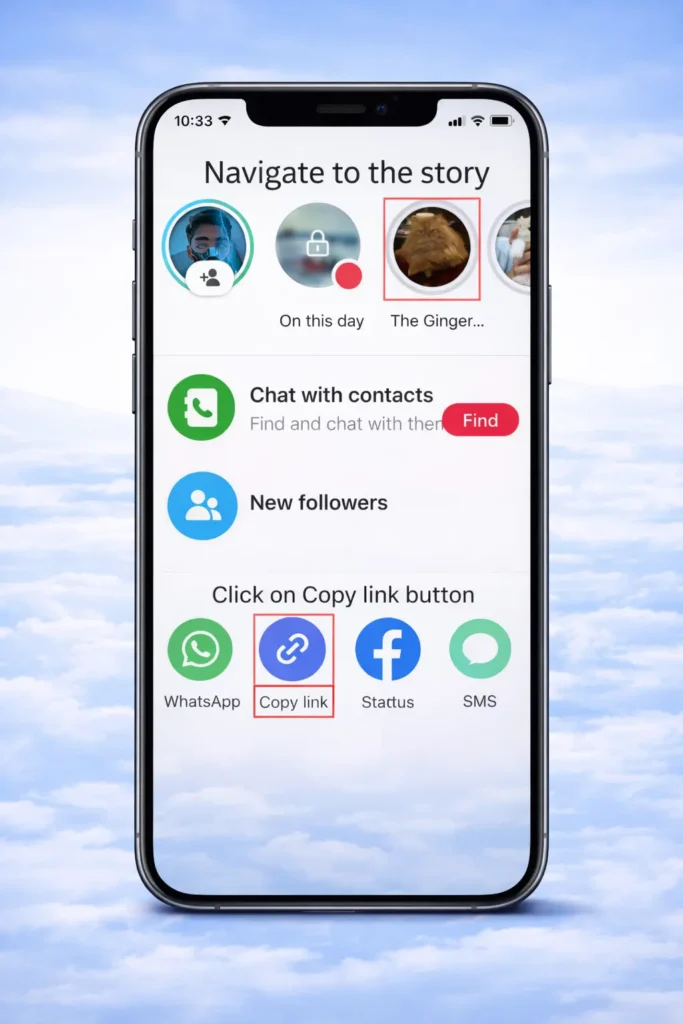
- Click "Share" and copy the link
- Paste the link above and click Download
SnapTik’s TikTok Story downloader is a free tool that lets you view TikTok stories anonymously and download them without a watermark. Since TikTok stories disappear after 24 hours, our TikTok Story Downloader helps you save them before they’re gone. The tool supports multiple video download formats, including MP4, HD, and 4K. Icing on top, it works directly in your browser and there is no need to install any apps or extensions. Simply paste the TikTok story link you want to view anonymously, and freely enjoy your favorite content.
What Is a TikTok Story Downloader?
Our TikTok Story Downloader is an online tool created to help you download TikTok stories without watermark. Unlike regular TikTok videos, stories on Tik Tok remain visible for only 24 hours, which makes them temporary. To save the story content you love and view it anonymously, you need a free anonymous story viewer. Our custom-built Snap Tik Story viewer helps you in this regard.
Our Snap Tik’s story downloader works directly inside your browser, so you do not need to install any additional software.
Why Download TikTok Stories?
Unlike public videos, TikTok stories are viewable for only 24 hours. In addition to that, TikTok story content includes a TikTok watermark overlay or a creator’s branding that gets saved when downloading the video.
Many users prefer downloading TikTok stories to:
Our TikTok Story Downloader simplifies this process and provides clean MP4 video files that you can store safely on your device.
How to Use a TikTok Story Downloader
Unlike other Tik Tok story downloaders that require many clicks to download a video, our TikTok Story Downloader is simple and only requires only three steps:
Step 1 – Copy the Story Link
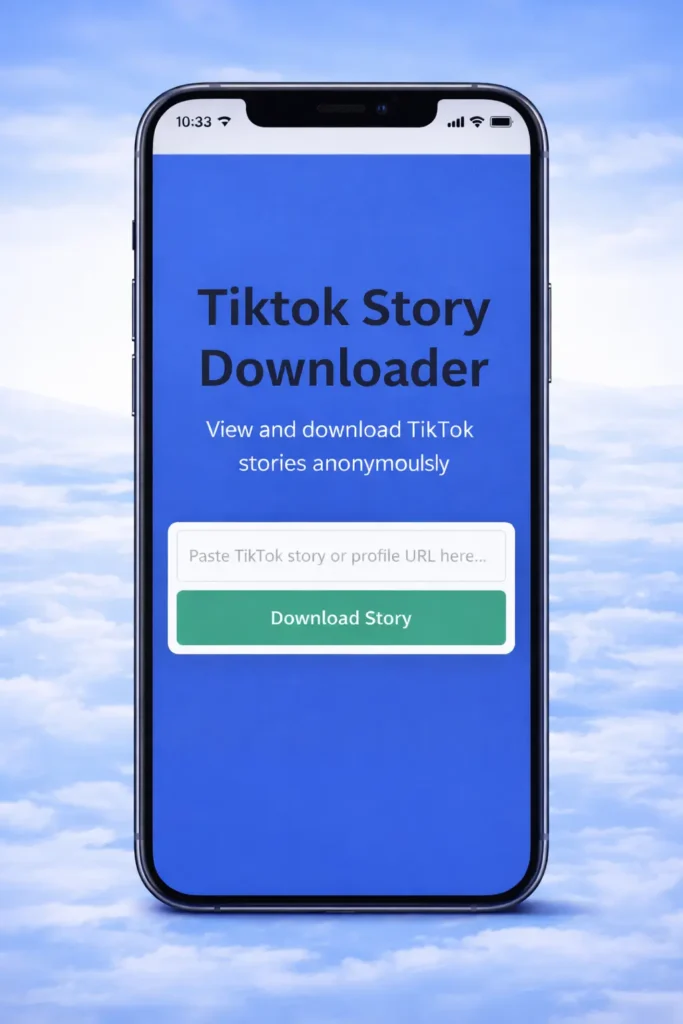
Step 2 – Paste the Link
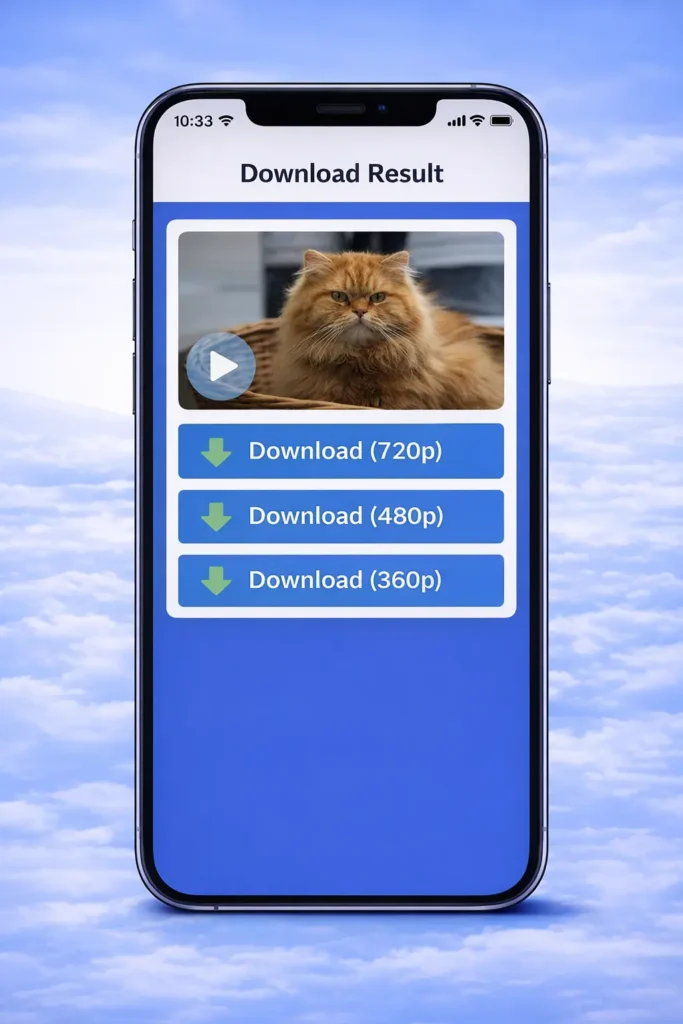
Step 3 – Download the Story
Key Features of a Reliable TikTok Story Downloader
Simple, efficient, and free – not all tools offer these premium experiences. Key features of SnapTik Story downloader are given as:
No Watermark Downloads
Our tool allows you to download stories without TikTok logos or animated usernames embedded in the video. A watermark free video enables you to use your favorite content for creative purposes.
High-Quality MP4 Format
Enjoy multiple video quality options including MP4 format and HD or 4K resolutions. Our story downloader preserves sharpness and clarity while maintaining original video details.
Cross-Platform Compatibility
SnapTik’s TikTok Story Downloader works on:
No Installation Required
What makes this story downloader unique is its functionality on browser. Since our downloader is web-based it do not require to install any setup application or a browser extension.
Free and Unlimited Access
We provide free and unlimited downloads without subscription fees or hidden restrictions.
Does Snap Tik TikTok Story Downloader Work on iPhone?
Yes! Our Story Downloader works perfectly on iPhone and iPad. Because the TikTok Story Saver runs directly in your browser, you can use it easily with Safari or any mobile browser.no apps required.
Follow these steps to download TikTok stories on you iPhone :
The saved file will appear in your device storage or files section. Enjoy your favorite content and share it with your loved ones.
Is It Safe to Use a TikTok Story Downloader?
Your safety depends on the website you choose. While many platforms rely on cookies, our tool does not. We prioritize user privacy and data security. It is important to mention that we do not have any access to your data. So, we do not:
Our website uses secure HTTPS encryption to protect your connection. Instead we caution that you should avoid platforms that request account access or ask you to install suspicious software.
TikTok Story Downloader vs Normal TikTok Download
TikTok Story Downloader vs Normal TikTok Download? Which one is the best? Let’s compare both methods clearly.
Downloading Directly from TikTok
Downloading videos directly from TikTok comes with following things:
Using SnapTik’s TikTok Story Downloader
Using SnapTik downloader you will get to enjoy following features for free:
For clean offline storage without branding overlays and watermark, a dedicated story downloader is the best choice.
Supported Devices and Browsers
Our TikTok Story Downloader works across multiple platforms. From mobile devices to desktop, this story viewer is compatible on all devices,
Mobile Devices
Desktop and Laptop
Supported Browsers
Since the tool runs directly in your browser, no installation is required.
Video Quality and Format Options
Sometime users need different video qualities based on personal choices and available storage. We allow you to choose between different video quality levels depending on availability. All the video qualities have original video details in the Snaptik story downloader
Common options include:
Each video quality format is widely supported across:
Download Speed and Processing Time
One major advantage of SnapTik’s web-based TikTok Story Downloader is fast server-side processing. After the link is pasted, it just becomes matter of just a few seconds.
Once you paste the link in SnapTik downloader’s input box:
Downloading of your video usually completes within seconds, depending on your internet speed.
Privacy and Data Protection
User privacy is important to us.
We do not require account login, store story content permanently, or track personal download history. That is how we have no access to the user’s data. Our system processes publicly available URLs only and does not interfere with user accounts and details.
Why Stories Disappear After 24 Hours
TikTok stories are designed as temporary content. After 24 hours, they automatically disappear from public view. The content creators share their hourly updates on their stories, that is why, these updates are time limited.
Because of this limitation, many users rely on a TikTok Story Downloader to preserve:
Once downloaded, the story remains stored permanently on your device and easily accessible.
Important Disclaimer
SnapTik is an independent tool and is not affiliated with TikTok or ByteDance Ltd. All rights to content belong to their respective creators. SnapTik can not access users’ personal data. Users should respect content ownership and use downloaded videos responsibly.
Frequently Asked Questions
Conclusion
SnapTik’s TikTok Story Downloader offers a simple way to save TikTok stories before they disappear. You can download your favourite TikTok story in multiple video quality resolutions. With support for multiple devices, clean MP4 downloads, and fast processing, it allows you to preserve content for offline viewing and does not require installing any applications. By using this secure and reliable tool, you can download TikTok stories safely.